Automation-Restaurant
Automation Restaurant
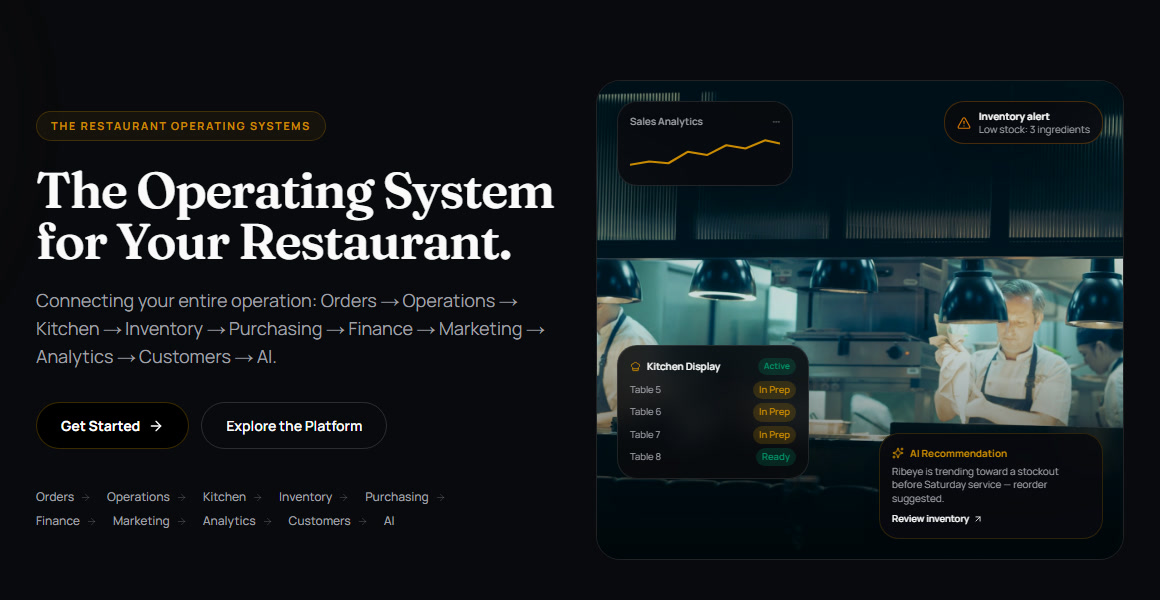
One connected operating system for a restaurant — customer ordering, kitchen tickets, recipes, inventory, suppliers, finance, staff and AI, all on the same live data.
- Website: https://web-rho-rosy-56.vercel.app
- Each restaurant runs on its own Supabase project, created automatically at sign-up. One restaurant’s data never shares a database with another’s.
Contents: Problem statement · Proposed solution · Screenshots · Technology stack · AI methodology · AI models and APIs · Development tools · Setup and installation · Team member contributions
Problem statement
New restaurants often face high upfront costs and technical complexity when they have custom restaurant management software built for billing, orders, inventory, menus and kitchen operations. Building and maintaining that software takes developers, time and money that a new restaurant rarely has.
Proposed solution
Automation Restaurant is an AI-powered, subscription-based Restaurant Management System (RMS). It lets a restaurant manage billing, orders, menus, inventory, kitchen operations, suppliers and finances on one central platform.
- Ready to use: instead of hiring developers to build custom software, the owner signs up and gets working tools straight away.
- Automated workflows: an order flows to the kitchen, stock, suppliers and finance without anyone re-typing it.
- AI insights: an AI assistant answers questions from the restaurant’s live data, and AI imports turn existing menus and documents into records.
- Affordable and scalable: modular features, plan tiers and role-based portals let a restaurant start small and grow, including independent branches, without the cost of development and ongoing maintenance.
Why Automation Restaurant
| Unique selling point | What it means for the owner | |
|---|---|---|
| 🔗 | One live data layer | An order flows to the kitchen, stock, suppliers, finance and the dashboard at once. Nobody re-types anything. |
| 🧾 | Recipe-driven stock | Every sale deducts its recipe’s exact grams, millilitres and pieces, so food cost is known per dish as it sells. |
| 🍗 | Shared-ingredient availability | When chicken runs low, every dish that uses it is recalculated. Guests only see what the kitchen can actually make. |
| 🤖 | AI Smart Import | Upload an existing menu, recipe, inventory or supplier PDF. AI builds a draft, and nothing is saved until the owner approves it. |
| 💬 | AI on every side | The owner assistant answers from live data and reads or writes PDFs. Guests get a menu assistant, and visitors get a website AI Guide. |
| 📱 | QR ordering, no app | Guests scan the table, order, track it live from kitchen to table, order more and leave feedback. They never sign up. |
| 💰 | True profit, live | Every sale, refund, food cost, expense, supplier bill and cash movement is written to one financial ledger as it happens, so P&L, payables and the day close always agree. Exported as a branded PDF or Excel file. |
| 🔁 | Closed purchasing loop | Low stock → purchase order → goods received → stock updated → supplier bill due on that supplier’s terms. |
| 🛡️ | Portals built from permissions | Each staff portal is composed from individual permissions, enforced by the database rather than just hidden buttons. |
| 🏢 | A database per restaurant | Every restaurant gets its own Supabase project, provisioned automatically at sign-up. |
Screenshots
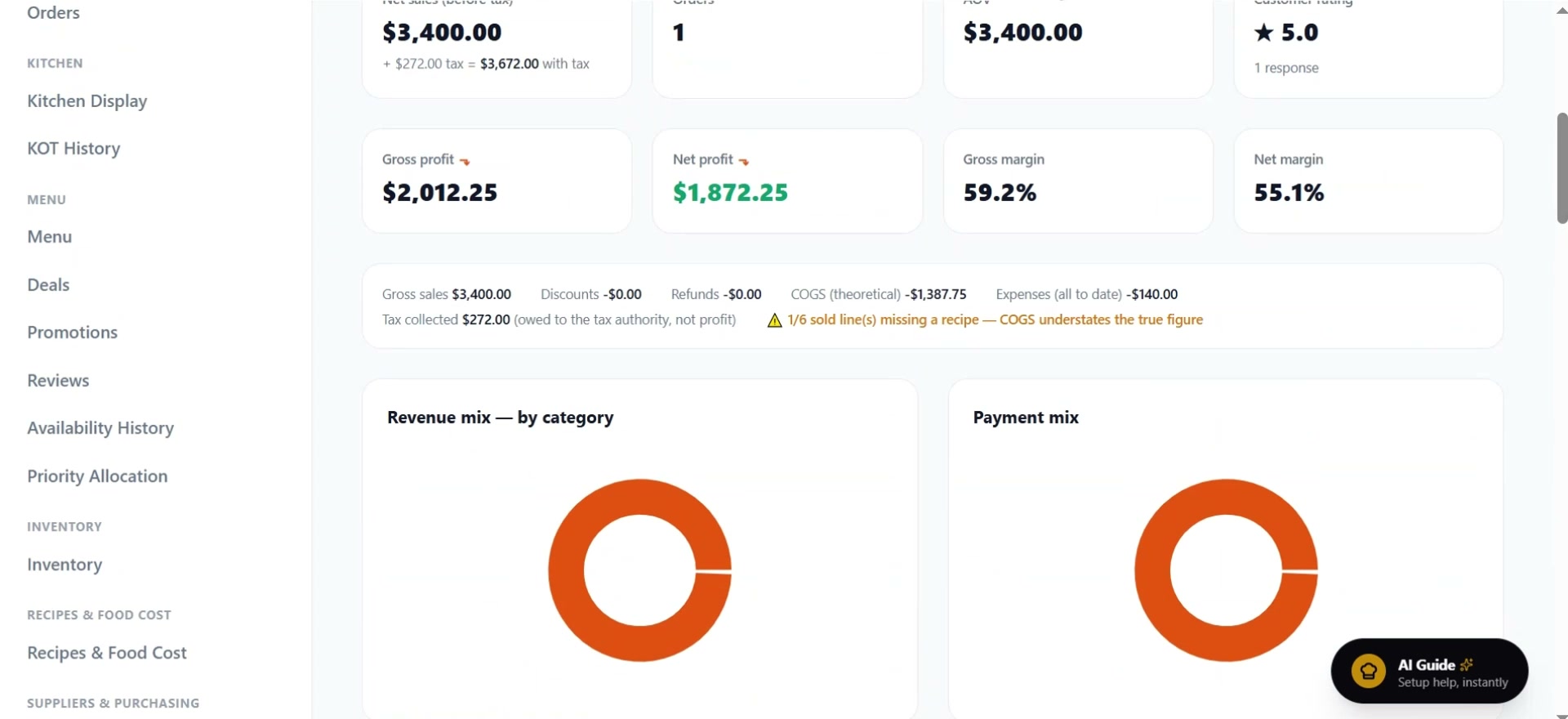 Owner dashboard: net sales, tax, gross and net profit, margins, revenue and payment mix |
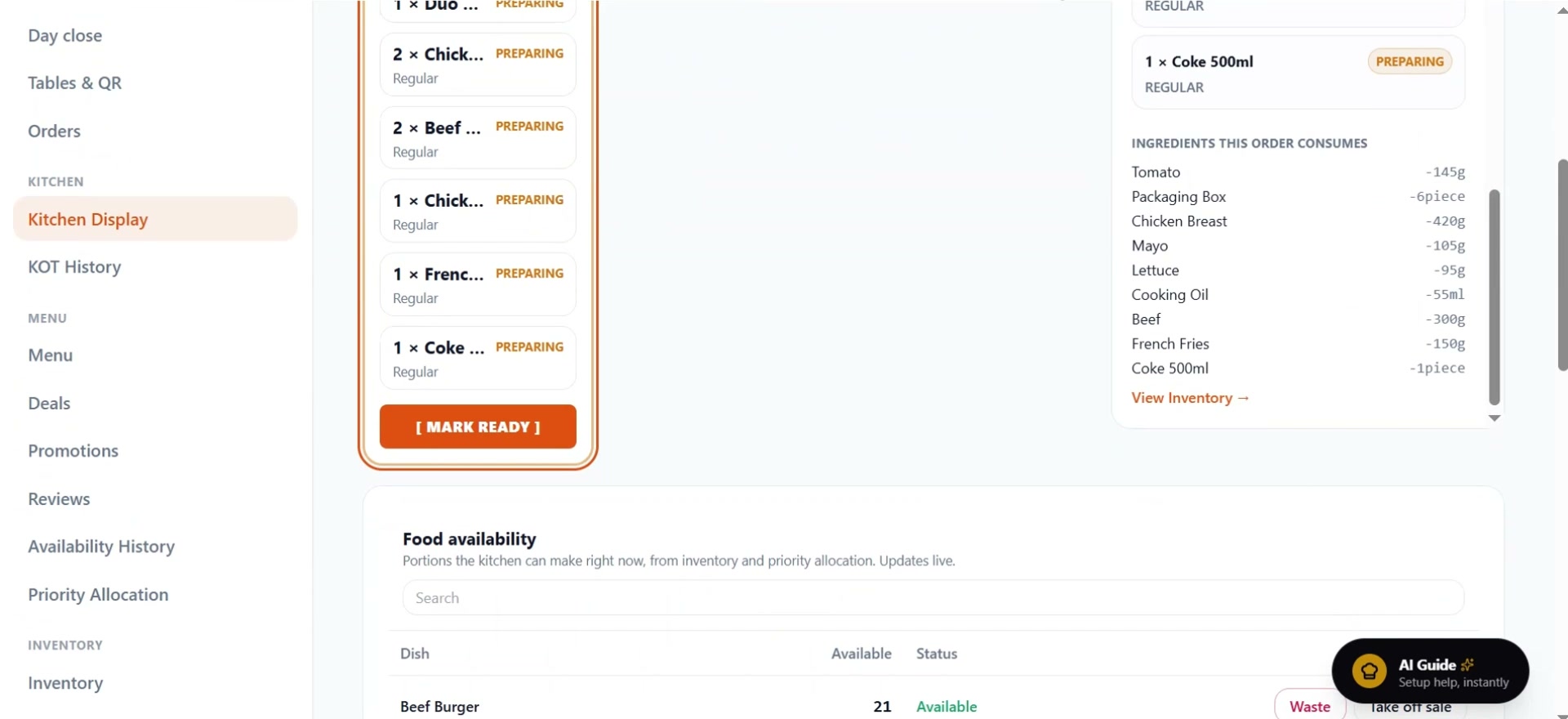 Kitchen Display: live tickets, the ingredients each order consumes, and portions left |
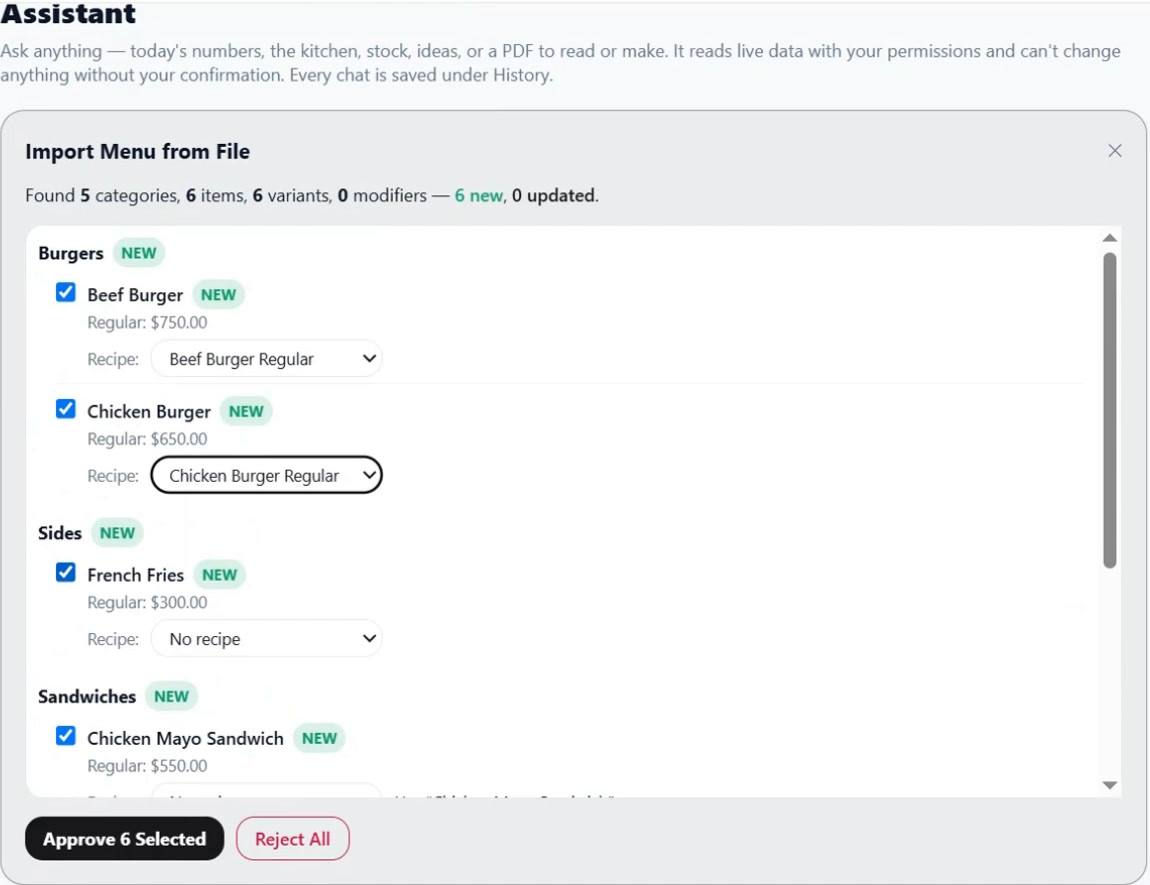 AI Smart Import: a menu PDF becomes 6 new items in 5 categories, each linked to its recipe, ready to approve |
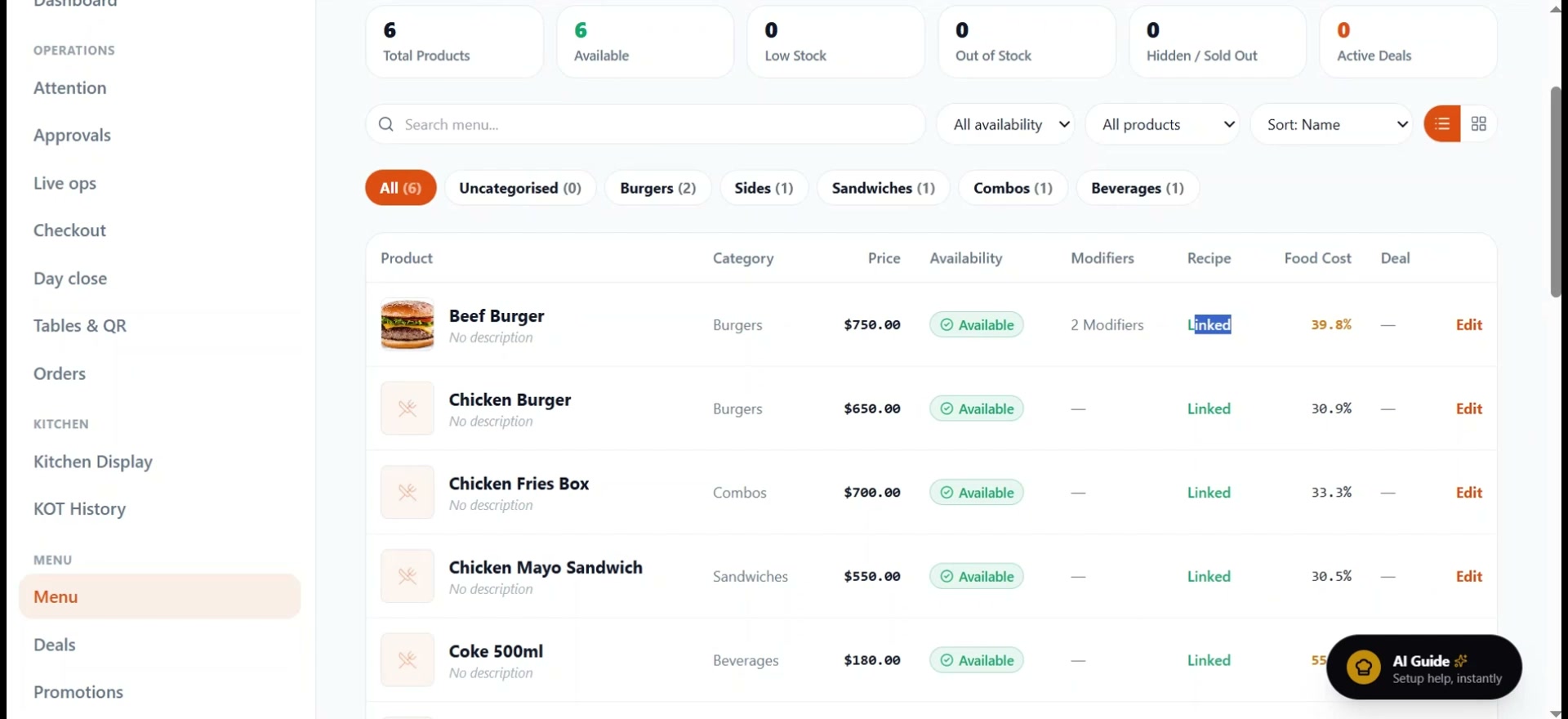 Menu management: price, availability, linked recipe and food cost % per dish |
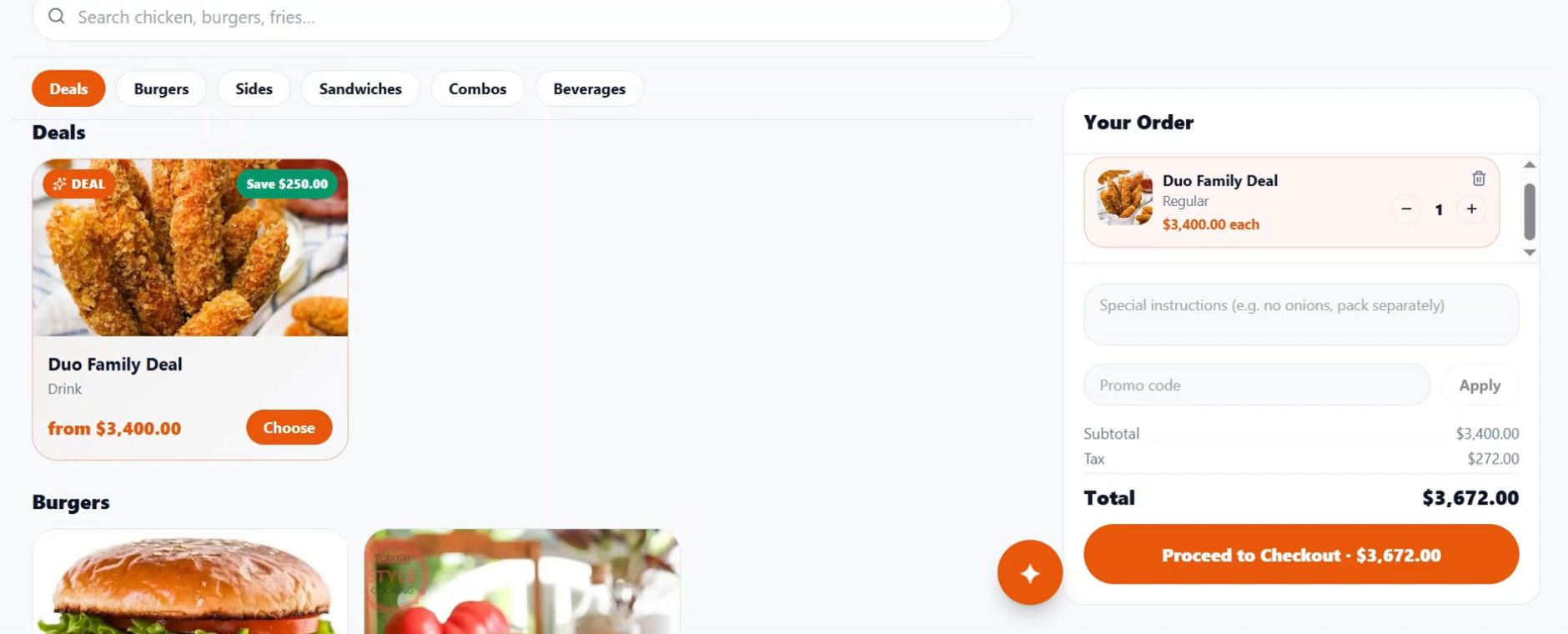 Customer menu: categories, deals that show the saving, notes, promo codes and tax before checkout |
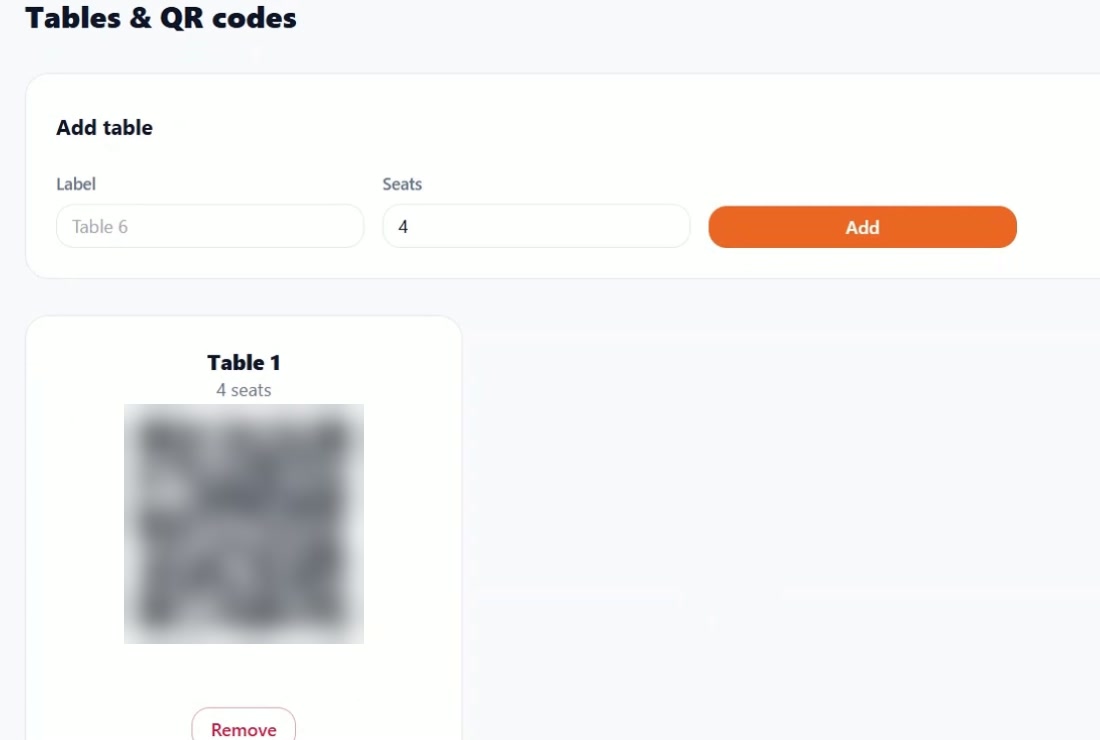 Tables & QR codes: every table gets its own QR code (blurred here) |
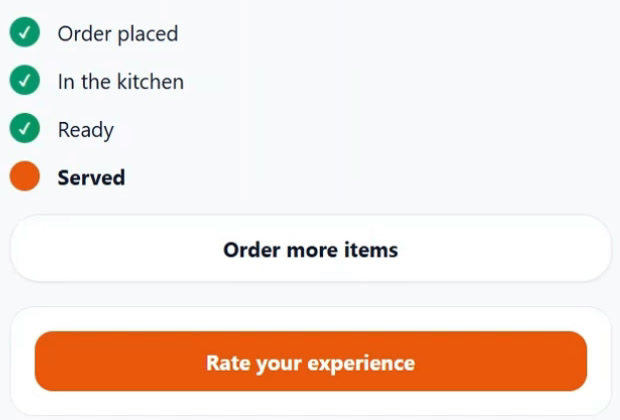 Order tracking: placed → in the kitchen → ready → served, plus order more |
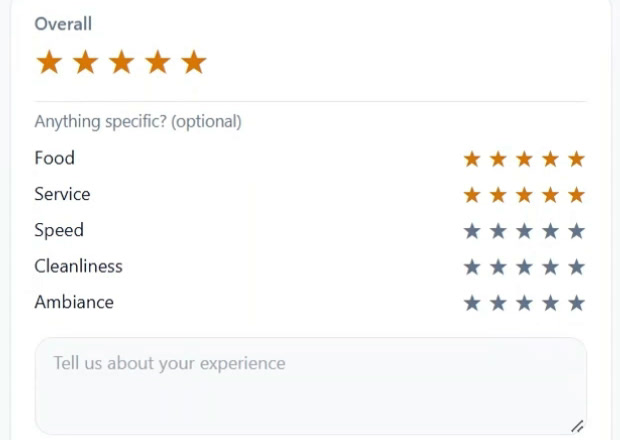 Guest feedback: overall rating plus food, service, speed, cleanliness and ambiance |
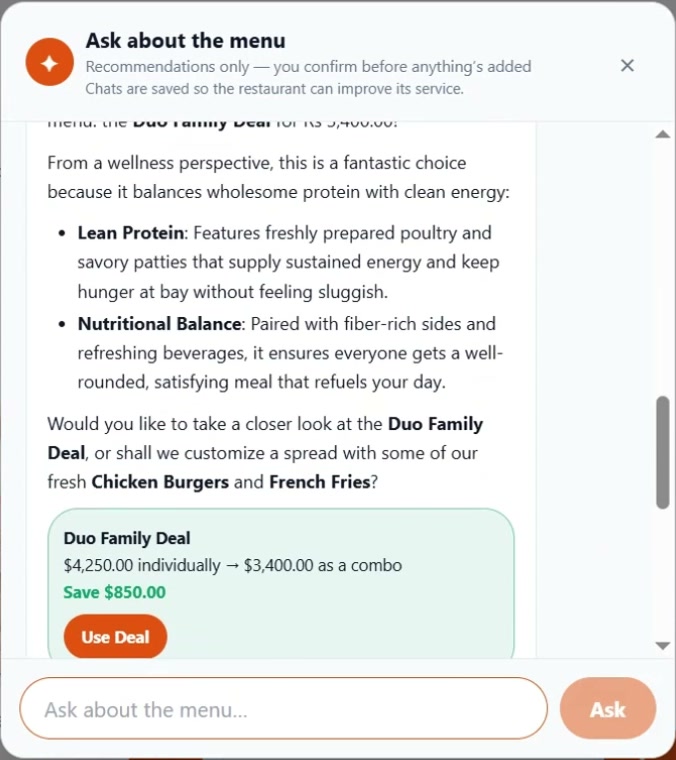 Customer menu assistant: recommends dishes and calculates real deal savings |
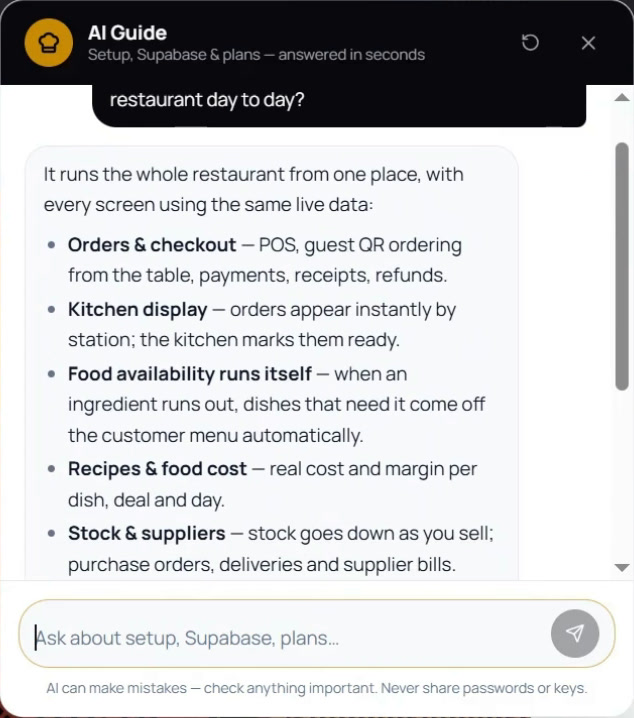 Website AI Guide: explains the product and walks owners through setup |
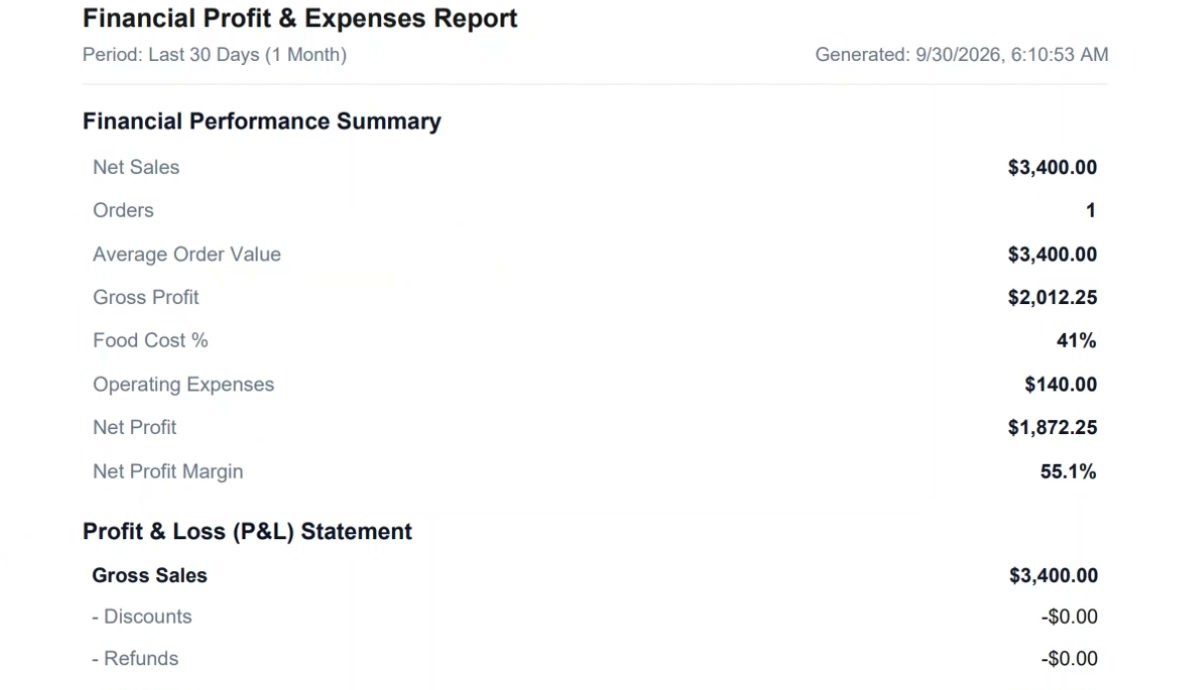 P&L report: a branded PDF of sales, food cost, expenses and net profit |
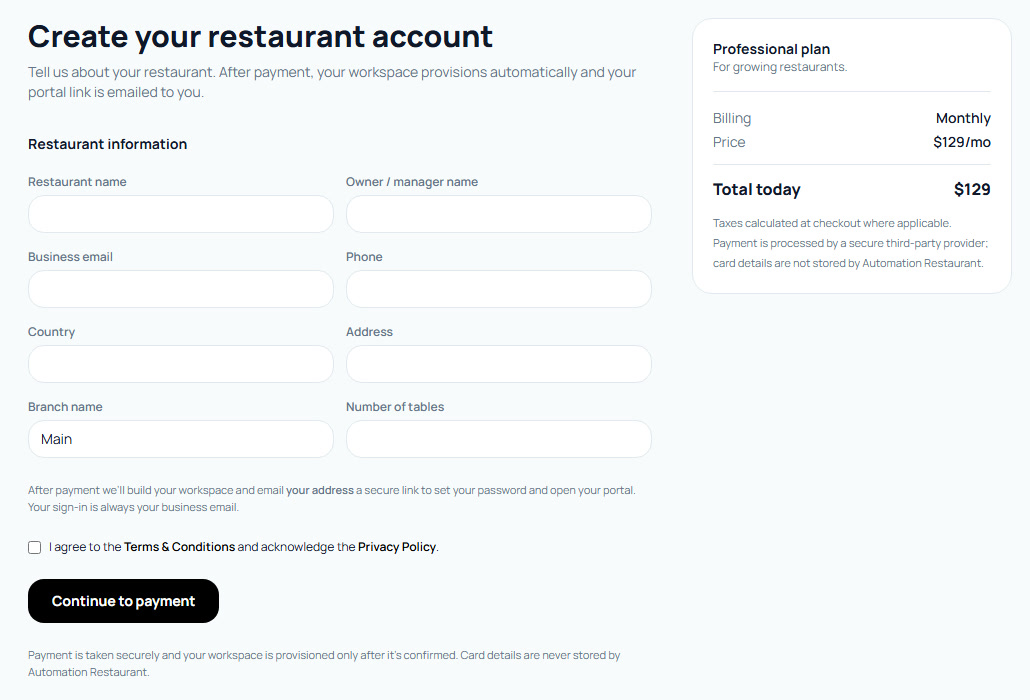 Sign-up: one form, secure payment, then automatic provisioning |
Screenshots use a test restaurant with test data.
What it does
| Area | Features |
|---|---|
| Guests | Table QR codes, no-login ordering (/order/<slug>?table=…), search and categories, deals with the saving shown, special instructions, promo codes, tax shown before checkout, live order tracking (placed → in the kitchen → ready → served), order more from the same table, five-part ratings, “Ask about the menu” AI |
| Kitchen | Kitchen Display (KOT queue → preparing → ready), the ingredients each ticket consumes, portions left per dish, KOT history |
| Menu & recipes | Categories, variants, modifiers, deals, promotions; recipes in base units (g / ml / piece) linked to dishes; per-dish food cost and margin; availability calculated from stock |
| Inventory | Stock on hand, low-stock thresholds and email alerts, automatic deduction by recipe on every order, shared-ingredient impact across dishes |
| Purchasing | Supplier directory with payment terms, purchase requests → purchase orders → goods received → stock update → supplier invoices with a 3-way match (PO ↔ delivery ↔ invoice), typed exceptions, credit notes, and AI reading of invoice PDFs and photos |
| Finance | Finance overview (P&L vs the previous period, food cost % vs target, payables aging, needs-attention list), append-only ledger with corrections, expense approval workflow, supplier payables, cash movements and a locked day close, branded PDF and Excel finance reports — see Finance model |
| Staff & access | Staff without logins (name, job, shift), custom portals built from individual permissions with a live preview, approvals, audit log, attendance and scheduling |
| AI | Owner assistant (live answers from restaurant data, reads and creates PDFs, every chat saved), Smart Import (upload a menu, recipe, inventory, supplier, table, staff or PO document → reviewable draft → approve), customer menu assistant, website AI Guide |
| Brand | Brand Kit (logo, colours, receipt style) applied to the menu, receipts, invoices and reports |
| Branches | Owner panel for a group of locations: create independent branches (each its own database), a login per branch (password shown once), per-branch receipt details, rename, archive / restore, delete permanently, side-by-side comparison, one-click switching between workspaces — see Multi-branch |
| Platform | Marketing site, self-service sign-up and payment, automatic provisioning, plan tiers and upgrades, super-admin console |
How a restaurant goes live
| Step | What happens |
|---|---|
| 1. Sign up | Pick a plan on the website, fill in one form, pay. The owner connects a free Supabase account and a dedicated database is provisioned automatically, then a set-password email is sent. |
| 2. AI import | Upload existing menu, recipe, inventory and supplier files; review the draft (new / changed / missing prices); approve. |
| 3–6. Check the data | Suppliers, inventory (costs and alert levels), recipes (food cost per dish), menu (each dish linked to its recipe). |
| 7. Portals | Give each job its own portal from individual permissions. |
| 8. Order | Guests scan the table QR code, or the cashier rings the order up. |
| 9. Kitchen | The KOT appears on the Kitchen Display; the guest’s tracking page follows it. |
| 10. Stock | Every ingredient in the order’s recipes is deducted; availability updates. |
| 11. Purchasing | Low stock alerts the owner and drafts a purchase order to the supplier. |
| 12. Results | Dashboard, reports and the AI assistant all read the same numbers. |
Technology stack
| Layer | Technologies |
|---|---|
Frontend (apps/web) |
Next.js 15 (App Router), React 19, TypeScript, Tailwind CSS, Lucide icons, Recharts (finance and performance charts), jsPDF + jspdf-autotable (PDF reports), qrcode (table QR codes), Zod (input validation) |
Backend (apps/api) |
Node.js, Express and TypeScript, deployed as Vercel serverless functions; Zod (request validation), ExcelJS (Excel exports), unpdf (reading supplier invoice PDFs), Nodemailer / Resend (transactional e-mail and supplier messages), Stripe (subscriptions and plan billing) |
| Database & multi-tenancy | Supabase PostgreSQL with a dedicated Supabase project for each restaurant, so restaurant data is physically separate |
| Control plane | A central Supabase project for restaurant registrations, subscriptions, plans and connections to owners’ Supabase accounts |
| Provisioning | Supabase OAuth and the Management API create each restaurant’s database in the owner’s own Supabase account, including independent branches |
| Security | About 78 Row-Level Security policies and 247 restricted (security-definer) database functions; permissions are enforced in Postgres, not only in the UI |
| Auth & realtime | Supabase Auth, with separate session slots so the owner panel, staff portals and branches can stay signed in side by side; Supabase Realtime for live kitchen, order and checkout updates |
| Schema management | 107 versioned tenant migrations plus a reusable template schema for every new restaurant |
| AI | Google Gemini (Flash and Flash-Lite) as the primary provider; the Anthropic Claude SDK as a second provider — see AI models and API usage |
| Infrastructure | Vercel for both apps, redeployed automatically from GitHub; npm workspaces monorepo (apps/web, apps/api, packages/shared) |
| Testing | Test scripts run with tsx against real tenant databases inside transactions that are rolled back afterwards |
AI methodology and implementation
AI in Automation Restaurant is built to deliver practical outcomes across day-to-day operations, always on the restaurant’s own live data and always under human control.
| AI feature | What it does | Outcome |
|---|---|---|
| Owner & staff assistant | Answers questions about sales, profit, food cost, stock, suppliers, kitchen, staff and branches (one branch, or all side by side), and proposes actions (drafting a purchase order, adjusting stock, adding menu items). Knows whether it is in the owner panel or a branch, and who it is talking to | Faster decisions; less time spent digging through reports |
| AI Guide | Step-by-step, role-specific help on the website and inside the app, including setting up and managing branches and fixing a failed branch setup | Faster staff onboarding, less training effort, fewer operational errors |
| AI Import | Turns prompts or uploaded menu, recipe, inventory, supplier, invoice, purchase-order, staff and table files into structured, validated drafts | Much less manual data entry; faster menu and stock setup |
| Customer AI | Helps guests explore the menu, understand ingredients and find relevant deals | A better ordering experience, more conversions and a higher average order value |
| Billing assistant | Answers the owner’s questions about plans and the subscription, and explains that branches are billed on the main plan while their Supabase projects are Supabase billing | Self-service billing support |
How it is implemented
- Tools, not guesses. The assistant reads business data only through 71 permission-checked tools (53 that read figures, 17 that propose actions, and one that writes a PDF document). Each tool checks the signed-in user’s permissions before it runs, so the AI sees only what that person may see.
- Human confirmation. An action tool only proposes a change. It runs after a person taps Confirm. The AI never approves expenses or invoices and never makes payments.
- Drafts, then approval. AI Import (
aiDocumentEngine) extracts text from PDFs, images, spreadsheets and text files, asks the model for output that must match a fixed schema, validates and cleans the result, compares it with live data (new / changed / missing), and shows a draft. Nothing is saved until the owner approves it. - Grounded answers. Figures come from the same ledger and reports as the rest of the app; the AI is instructed never to invent numbers.
- Knows the platform as it is now. Each assistant’s instructions describe
the current product, and are updated with every feature:
- the owner panel, independent branches and their management;
- branch logins and receipt details;
- what a branch manager can and can’t do.
A workspace line tells the owner assistant where it is (the owner panel with its branches, or one branch) and who it is talking to (the owner or the branch manager). It can’t create, archive or delete branches, set logins or change receipt details. It explains where to do that instead, and it never states or asks for a password.
- One platform. Combined with POS, kitchen, inventory, recipes, suppliers and finance, the AI reduces administrative work, improves stock visibility and keeps the customer experience consistent.
AI models and API usage
Automation Restaurant uses Google Gemini as its primary AI provider, with
the Anthropic Claude API as a built-in alternative. The server picks the
provider from its configuration (GEMINI_API_KEY first, then
ANTHROPIC_API_KEY); if neither is set, AI features switch off gracefully. The
live deployment uses Gemini.
| Provider | Models | Used for |
|---|---|---|
| Google Gemini | gemini-3.5-flash-lite, gemini-3.1-flash-lite, gemini-3.8-flash, gemini-3.7-flash, gemini-3.5-flash, gemini-flash-latest, gemini-flash-lite-latest (default GEMINI_MODEL: gemini-flash-lite-latest) |
Every AI feature (primary) |
| Anthropic Claude | claude-sonnet-5 (configurable with AI_MODEL) |
Every AI feature (alternative) |
| API | How it is used |
|---|---|
Gemini streamGenerateContent (generativelanguage.googleapis.com/v1beta) |
Streaming chat replies, sent to the browser as server-sent events so answers appear as they are written |
Gemini generateContent |
Structured one-shot tasks such as document import and the AI Guide |
| Gemini function calling | Lets the model call the app’s permission-checked tools |
Anthropic Messages API (@anthropic-ai/sdk) |
The same features with tool use, when Claude is the configured provider |
| Endpoint | Feature |
|---|---|
/api/ai |
Owner & staff assistant (71 tools; actions confirmed through /api/ai/confirm) |
/api/public/ai/chat |
Customer AI on the guest menu (read-only, rate-limited per visitor) |
/api/public/guide-ai/chat, /api/guide-ai/chat |
AI Guide (public and signed-in) |
/api/saas-ai/chat |
Billing assistant (owner only) |
| Import routes (menu, recipe, inventory, supplier, supplier price, supplier invoice, PO, staff, table) | AI document import into reviewable drafts |
Reliability
- Model racing: if a Gemini model hasn’t started answering quickly, or fails or is overloaded, the next model starts in parallel; the first to answer wins and the others are cancelled.
- Structured output: imports force a fixed JSON schema and retry a bounded number of times on malformed output.
Security
- API keys stay on the server and never reach the browser.
- Uploaded documents are treated as data, never as instructions.
- The restaurant is identified from the authenticated session before any tool runs, never from the request body, so one restaurant can never reach another’s data.
- Customer AI is read-only, limited to the restaurant’s public data and rate-limited per visitor.
Development tools used
| Tool | Used for |
|---|---|
| Git & GitHub | Version control; every push to main triggers a deploy |
| Vercel | Hosting, preview and production deployments, cron jobs |
| npm workspaces | Monorepo for the web app, the API and the shared package |
TypeScript compiler (tsc) |
Type checking across packages/shared, apps/api and apps/web |
| tsx | Running the API in development and the test and migration scripts |
| Next.js build / dev server | Local development and production builds of the web app |
| Supabase (dashboard, CLI, Management API) | Databases, auth, migrations and automated provisioning |
| Stripe dashboard | Plans, prices and webhooks |
| Google AI Studio | Gemini API keys and prompt / function-declaration testing (docs/ai-studio) |
| Claude Code | AI-assisted development, code review and testing |
| PostCSS & Autoprefixer | Tailwind CSS build pipeline |
Finance model
Every finance screen, report and AI answer reads from one place: the
financial ledger (financial_events). Database triggers write an entry
whenever money moves, so nobody re-types figures and the numbers cannot drift
apart.
 orders · payments · refunds ─┐
 expenses (approved / paid) ──┤
 supplier invoices · payments ┼──>  financial_events  ──>  Finance overview · Ledger · P&L
 credit notes · stock · waste ┤     (append-only)          Day close · PDF / Excel · AI
 cash movements · day close ──┘
What the ledger records
| Category | Written when | Effect |
|---|---|---|
| Sales | An order is served or paid; reversed on refund or void | Net sales (subtotal − discount − refunds) |
| Food cost | The same orders, using each line’s recipe cost | COGS, the same figure the profit report uses |
| Customer payments | Payment taken, refunded or voided | Money held from customers |
| Expenses | An expense is approved (never while still a draft or submitted) | Operating cost on its expense date |
| Supplier payables | An invoice is approved (+); supplier payment or credit note (−) | What the restaurant owes |
| Inventory and waste | Goods received, stock adjustments, spoilage, at cost | Stock value |
| Cash, day close, purchasing | Till movements, counts, closes, purchase orders | Information only; no balance change |
| Adjustments | A person with Adjust ledger posts a correction with a reason | Fixes a figure; nothing existing is changed |
Ledger rows can’t be edited or deleted, even by the database owner. A mistake is fixed by posting a reasoned correction, which is also written to the audit log.
The workflows
- Expenses: draft → submitted → approved → paid (or rejected / void). An expense counts as a cost only once it is approved, and it is counted once even after it is paid. Receipts are stored in a private bucket.
- Supplier invoices: received → 3-way match against the purchase order and
the goods received → matched or on hold → approved → partially paid / paid.
- A hold is typed: total, missing PO, supplier, PO mismatch, missing delivery, quantity, price, duplicate or other.
- A rejected invoice keeps its reason and full history.
- The AI can read an invoice PDF or photo into a draft, but a person always reviews and applies it.
- Cash and day close:
- Pay-ins, pay-outs, bank drops and adjustments each need a reason, and none can be edited afterwards.
- The close preview shows sales, payments by method, expected cash and any exceptions.
- Any difference between counted and expected cash needs a reason.
- A closed day is locked: no new orders, payments, expenses, counts or movements can be dated to it. Refunds are still allowed.
- Reopening a day needs its own permission and a reason.
Separation of duties
Each step needs its own permission, so the person who records, approves and pays can be three different people.
| Step | Permission |
|---|---|
| Record or edit an expense | finance.create_expense / finance.update_expense |
| Approve or reject an expense | finance.approve_expense |
| Pay an expense | finance.pay_expense |
| Create or match a supplier invoice | invoices.create / invoices.match |
| Approve or reject a supplier invoice | invoices.approve (not payables.manage) |
| Pay a supplier | payables.record_payment |
| Cash movements | cash.manage |
| Close / reopen a day | finance.close_day / finance.reopen_day |
| Post a ledger correction | finance.adjust_ledger |
| See food cost and profit | finance.view_cogs / finance.view_profit |
The owner holds all of them. Other roles and portals get exactly the ones they are granted, and each one works the same way in a custom portal. Every check runs in the database: hiding a button is never the only protection. The AI never approves or pays anything.
Finance screens and reports
- Finance overview (
/r/<slug>/finance):- Net sales, food cost, gross profit, operating expenses, operating profit and payments received, compared with the previous period.
- Food cost % against the restaurant’s target (editable; 30% by default).
- Money owed to suppliers and overdue.
- A needs-attention list: unclosed days, invoice exceptions, invoices waiting for the 3-way match, expenses awaiting approval.
- Payables aging (not yet due, 1–30, 31–60, 61–90, 90+ days).
- A food-cost watch of dishes over target or whose recipe cost rose in the last 30 days.
- Ledger (
/r/<slug>/finance/ledger): every entry, filterable by period and category, with totals and a link back to the screen where its source record is managed. - Finance report: a branded PDF (P&L, expenses, supplier payments, purchasing) and an Excel workbook (ledger, payables aging, cash & day close, accounts payable, supplier payments, expenses), in the restaurant’s own time zone.
Operating profit = net sales − food cost − approved expenses dated in the period.
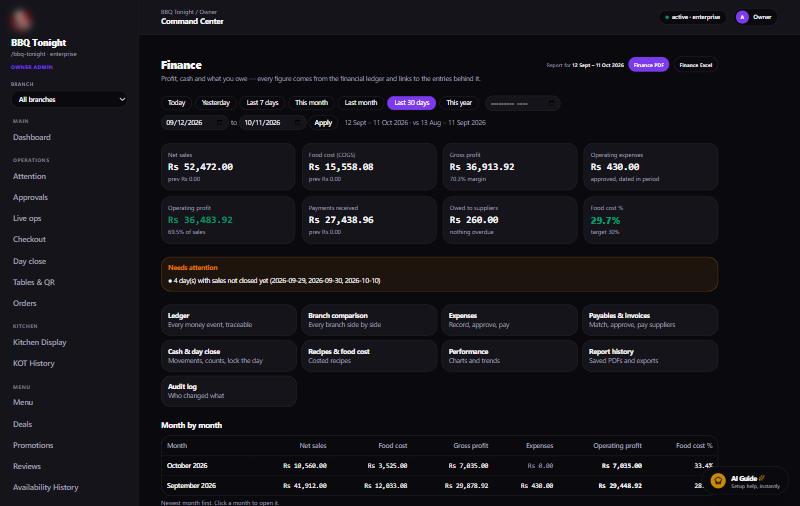 Finance overview: net sales, food cost, gross and operating profit, payments received, money owed, food cost % against target, what needs attention, month by month |
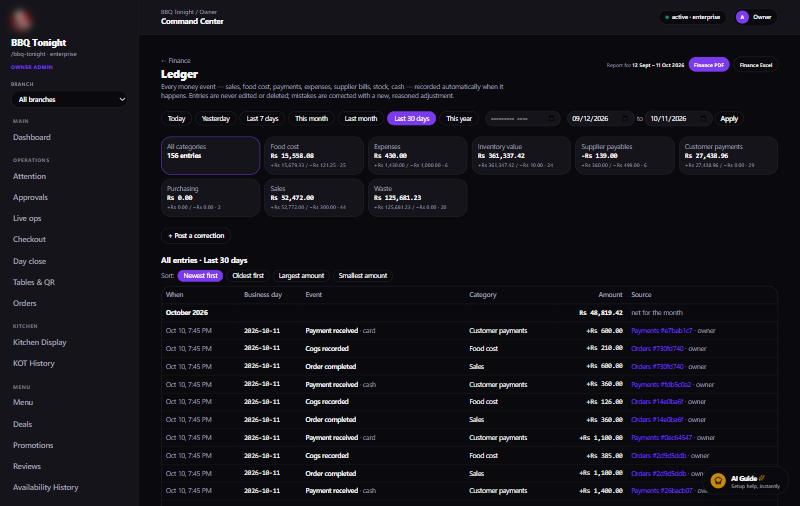 Ledger: every money event with its business day and a link to its source; totals per category; corrections only, never edits |
Multi-branch
On the Enterprise plan (branches.multi) an owner runs several locations as
independent restaurants under one owner panel. A restaurant on a
single-location plan keeps working exactly as before.
Owner panel and branches
- The main restaurant is the owner panel. It shows only what the owner
needs to run the group:
- Overview: a card per branch;
- Branches: create and manage;
- Compare branches;
- the AI assistant and AI Guide;
- Billing;
- defaults for new branches: Brand Kit, currency and tax.
Orders, kitchen, menu, stock, suppliers, staff and finance all run inside a branch, including the owner’s first shop.
- Each branch is its own restaurant:
- it has its own Supabase project, created in the owner’s Supabase account through the main restaurant’s connection, by the same automated provisioning as any new restaurant;
- it has its own login, menu, recipes, inventory, suppliers, orders, kitchen, staff, portals, finance and reports;
- branch databases are never merged.
- Creating a branch:
- In Branches → Add a branch, the owner gives a code (e.g.
DHA), a name (e.g. “DHA Phase 6”) and that branch’s receipt details. - Setup takes a few minutes. The branch is never shown as ready before it really is, and a failed setup can be retried.
- In Branches → Add a branch, the owner gives a code (e.g.
- One-time copy. A new branch starts with a copy of these:
- the menu, recipes and ingredients (stock set to 0);
- suppliers and deals;
- branding, tax and currency.
The copy comes from the owner panel if it has a menu; otherwise it comes from the first branch that has one. So a new owner sets the menu up once and later branches start from it.
Orders, stock levels, staff and finance start empty. The copy runs as one transaction: all of it, or nothing.
- Monitoring and comparison:
- The Overview shows a card per branch: orders, net sales, operating profit, low stock, money owed and days not closed.
- Compare branches puts every branch side by side for any period: this month, last month, the last 7 or 30 days, or custom dates.
- The comparison shows orders, net sales, food cost and food cost %, expenses, operating profit and margin, average order, low stock, money owed and days not closed.
- It adds an all-branches total and names the most profitable branch.
- Every figure is read from that branch’s own database.
- Switching workspaces. The Workspace selector opens any ready branch with a one-time sign-in, without logging out of the owner panel. Back to the owner panel returns to it.
Managing a branch (Branches → Manage, owner only)
| Option | What it does |
|---|---|
| Branch login | Sets the branch manager’s email (and name). The password is typed or generated (e.g. Ab3k-9QxP-7mTd) and shown once to copy. Generate new password makes a new one. Passwords are never stored readably, so they can’t be shown again. Sign-in address: /r/<branch-slug>/login. |
| Receipt details | That branch’s own address, phone, email, website, tax/NTN number and receipt footer, printed on its receipts and invoices only. Set while creating the branch, editable here any time. |
| Edit | Renames the branch. Its code and address stay the same. |
| Archive / Restore | Archive switches the branch off: no sign-ins, no orders, and it leaves the figures. Every record is kept, and it can be restored. |
| Delete permanently | Deletes the branch’s Supabase project and all its data. The owner types the branch code to confirm. Cannot be undone. |
What a branch manager can do
| Branch manager | Access |
|---|---|
| Orders, checkout, kitchen, tables & QR | ✅ |
| Menu, deals, recipes, inventory | ✅ |
| Suppliers, purchasing, expenses, finance, day close | ✅ |
| Staff, shifts, kiosk portals, AI assistant, AI Guide | ✅ |
| Billing & subscription | ❌ |
| Restaurant settings (currency, tax, branding, receipt details) | ❌ |
| Change password | ❌ — only the owner changes passwords inside a branch |
| Branch creation, branch comparison, other branches | ❌ |
These rules are enforced by the database as well as by the screens:
- The branch manager’s login carries no
settings.*orbranches.*permission, so the branch database refuses any change to its settings or receipt details. - Another branch is a different database, which a branch login can never reach.
Safeguards
- Only the owner panel’s owner can create, retry, manage or open branches. Setting logins and permanent deletes also need the owner’s own account, not a delegated full-access login.
- A branch workspace can’t create branches of its own.
- A branch id is only ever looked up among the caller’s own branches.
- Creating the same code twice returns the existing branch instead of a second project. Two creates racing on one code also end with one branch.
- Branch details are checked before anything is written, so a bad value never leaves a half-made branch.
- The plan’s branch limit is enforced: branches only count, and the owner panel doesn’t.
- If Supabase refuses a new project because the owner’s organization reached the free plan’s 2 active projects, the branch shows that in plain words. To fix it, upgrade the organization or pause an unused project, then press Retry.
Where it lives
| Piece | Where |
|---|---|
Control-plane columns (parent_tenant_id, branch_code, copy status) |
supabase/control-plane/0025_branch_tenants.sql |
Receipt details held until a new branch is ready (branch_setup) |
supabase/control-plane/0026_branch_setup.sql |
| Create, provision, copy, metrics, logins, receipt details, archive, delete, owner sign-in | apps/api/src/lib/branchTenants.ts |
API (/api/owner-branches) |
apps/api/src/routes/ownerBranches.ts |
| Owner panel overview, switcher, Branches manager, comparison | apps/web/src/components/OwnerBranches.tsx |
| Compare branches page | apps/web/src/app/r/[slug]/(portal)/branches/compare |
| One-time sign-in page | apps/web/src/app/r/[slug]/auth/sso |
| API endpoint | Purpose |
|---|---|
GET /api/owner-branches |
The branches with their figures for a period |
POST /api/owner-branches |
Create a branch (idempotent per code; optional receipt details) |
POST /:id/advance, POST /:id/retry |
Move setup forward / retry a failed setup or copy |
POST /:id/open |
One-time owner sign-in into the branch |
GET/POST /:id/login |
The branch login (email only) / create or change it, with the password returned once |
GET/POST /:id/receipt |
The branch’s receipt details |
PATCH /:id |
Rename |
POST /:id/archive, POST /:id/restore |
Switch off and back on, keeping all data |
POST /:id/delete |
Delete the branch’s project and data (confirm = its code) |
The earlier in-database branch model (tenant migrations 0098–0106) is retired: its screens were removed and migration 0107 clears the old per-login branch limits. Its data stays in the database.
Architecture
                 Control-plane Supabase project
                 (tenants, plans, subscriptions, provisioning, registry)
                               │
  website sign-up ──> apps/api ──> Supabase OAuth / Management API
                               │      create project → apply tenant schema → seed roles + settings
                               │
   restaurant A project    restaurant B project    restaurant C project …
   (own auth users, menu,  (fully isolated —       (RLS on every table,
    orders, stock, chats)   own database)           permission-checked RPCs)
apps/webresolves/r/<slug>/…to that restaurant’s project and talks to it with the signed-in user’s JWT, so Row Level Security applies to every read.apps/apihandles anything that needs a secret: provisioning, billing, e-mail, AI calls, imports and cron jobs. It resolves the tenant and the user’s permissions from the JWT on the server and never trusts IDs, roles or permissions sent by the browser.- Service-role keys stay on the server and are never sent to the browser.
Repository layout
| Path | What it is |
|---|---|
apps/web |
Next.js 15 (App Router): marketing site, sign-up and onboarding, restaurant portal, custom portals, guest ordering, super-admin |
apps/api |
Express API (deployed to Vercel as a serverless function): provisioning, billing, staff, AI assistant and imports, customer AI, AI Guide, cron |
packages/shared |
Plan tiers and feature entitlements shared by API and web |
supabase/control-plane |
Migrations for the central registry project |
supabase/tenant-template/schema.sql |
Full schema applied to every new restaurant |
supabase/tenant-migrations |
Numbered migrations rolled out to existing restaurants |
docs/ai-studio |
System prompt and function declarations exported for Google AI Studio |
Main routes
| Route | For |
|---|---|
/, /pricing, /guide, /get-started |
Public website, plans, setup guide, sign-up |
/onboarding/… |
Payment confirmation, database connection, provisioning status, set password |
/r/<slug>/login |
Staff sign-in for one restaurant |
/r/<slug> |
Owner dashboard and every portal page (orders, KDS, menu, recipes, inventory, purchasing, suppliers, finance, staff, AI, settings …) |
/r/<slug>/finance, /r/<slug>/finance/ledger |
Finance overview and the ledger |
/r/<slug> (multi-branch) |
Owner panel overview: a card per branch and this month’s comparison |
/r/<slug>/branches |
Owner panel: create, manage (login, receipt details, rename, archive, delete) and open branches (Enterprise) |
/r/<slug>/branches/compare |
Compare branches side by side for any period |
/r/<branch-slug>/login |
A branch’s own sign-in (e.g. /r/bbq-tonight-dha/login) |
/r/<slug>/auth/sso |
One-time sign-in into a branch workspace |
/r/<slug>/portal/<portalKey> |
A custom portal, composed from its permissions |
/order/<slug>?table=… |
Guest ordering, tracking and feedback |
/admin |
Platform super-admin |
Plans
| Plan | Monthly | Annual (per month) |
|---|---|---|
| Starter | $49 | $39 |
| Professional | $129 | $103 |
| Enterprise | $299 | $239 |
Features are enforced per plan in both the API and the portal (packages/shared).
Setup and installation
Prerequisites: Node.js 20+ and npm, Git, a Supabase account (for the control-plane project and restaurant projects), and optionally a Google Gemini or Anthropic API key (AI features), a Stripe account (payments) and Resend or SMTP (e-mail).
-
Clone and install
git clone https://github.com/shiraz-eng/Automation-Restaurant.git cd Automation-Restaurant npm run setup # npm install + build packages/shared -
Create the control plane. Create a Supabase project and run the files in
supabase/control-plane/in order (SQL editor or Supabase CLI). Restaurant databases are created automatically later, fromsupabase/tenant-template/schema.sql. -
Set environment variables (names only — never commit values):
apps/api/.env—SUPABASE_URL,SUPABASE_SERVICE_ROLE_KEY(control plane),SUPABASE_ACCESS_TOKEN,SUPABASE_ORG_ID,SUPABASE_OAUTH_CLIENT_ID,SUPABASE_OAUTH_CLIENT_SECRET,SUPABASE_OAUTH_REDIRECT_URI,APP_URL,ALLOWED_ORIGINS,GEMINI_API_KEY(optionalGEMINI_MODEL) orANTHROPIC_API_KEY(optionalAI_MODEL),RESEND_API_KEYorSMTP_*,EMAIL_FROM,CRON_SECRET,STRIPE_SECRET_KEY,STRIPE_WEBHOOK_SECRET,STRIPE_PRICE_MAP,PAYMENTS_MODE. Seeapps/api/src/env.tsfor the full list and defaults.apps/web/.env.local—NEXT_PUBLIC_CONTROL_PLANE_URL,NEXT_PUBLIC_CONTROL_PLANE_ANON_KEY,NEXT_PUBLIC_API_URL,NEXT_PUBLIC_SITE_URL.
-
Run locally
npm run dev:api # API on http://localhost:4000 npm run dev:web # web on http://localhost:3000 -
Check and build
npm run typecheck # shared + api + web npm run build -w @automation-restaurant/web # production build of the web app -
Create a restaurant. Open http://localhost:3000, pick a plan and sign up. The restaurant’s own database is provisioned automatically and a set-password e-mail is sent to the owner.
Database changes
Every tenant schema change is done three ways so new and existing restaurants match:
- Add
supabase/tenant-migrations/NNNN_name.sql. - Mirror it into
supabase/tenant-template/schema.sql. - Bump
SCHEMA_VERSIONinapps/api/src/provisioning.ts(currently 107).
Roll it out to every live restaurant:
cd apps/api
npx tsx scripts/apply-tenant-migration.ts ../../supabase/tenant-migrations/NNNN_name.sql
Never weaken RLS; new tables get policies in the same migration.
Deployment
Both apps deploy to Vercel from main:
- web — root
apps/web, framework Next.js. - automation-restaurant-api — root
apps/api, served throughapi/index.ts.
Scheduled jobs (low-stock alerts and similar) call the API’s cron routes with
CRON_SECRET. See VERCEL_DEPLOY.md for the web environment variables.
Test scripts
apps/api/scripts/ holds end-to-end checks against real tenant projects, for
example rbac-test.cjs, portals-test.cjs, realtime-test.cjs,
test-recipe-linking.ts, test-availability-engine.ts and
test-performance-access.ts.
The finance suites run against every reachable restaurant in one go. Each database test is a single transaction that is rolled back, so no real data changes:
cd apps/api
bash scripts/run-finance-suite.sh
It covers the security hardening, ledger, expense workflow, invoice matching,
day close and finance overview suites, a full fictional restaurant day
(test-finance-scenario.ts) and cross-restaurant isolation against the live
API (test-tenant-isolation.ts).
Independent branches:
test-owner-branches.ts: 68 checks, run in-process against an in-memory control plane, so no real project is created. It covers:- owner-only access, and isolation between restaurants;
- idempotent create, including two creates racing on one code;
- never “created” before provisioning finishes; retry;
- plan and branch limits, and owner sign-in;
- branch logins: the password is shown once and never read back; the branch manager gets no settings, billing or branch permissions;
- receipt details set at creation and applied after the copy;
- rename, archive and restore, and permanent delete with code confirmation.
test-branch-seed.ts: rehearses the one-time menu copy inside a rolled-back transaction. Any database suite can rehearse a migration that is not applied yet: setPRE_SQL=<file.sql>. The migration runs inside the same rolled-back transaction.
Team member contributions
| Member | Role | Contributions |
|---|---|---|
| Name | Role | What this member built or did |
| Name | Role | What this member built or did |
Known limitations
- AI features use Google Gemini; the free quota can run out (HTTP 429/503). Use a paid key for production.
- Stripe price IDs must be set in
STRIPE_PRICE_MAPbefore live card payments work. - Each branch is a separate Supabase project in the owner’s account, so it counts toward that account’s project limit and cost (the Supabase free plan allows two active projects).
- Inside a branch the Change password button is shown only to the owner, but Supabase always lets a signed-in user change their own password through its API; the owner can override it at any time with Generate new password.
- Portal logins created inside a branch are still asked to set their own password at first sign-in.